Updated September 10, 2026
How to Register a Turkish Apple Account in 2026: A Field Guide
Turkey is one of the cheapest countries on the App Store for digital services. Over the past few months, while collecting regional pricing data on apps in the App Store, I have registered several Apple Accounts in different countries. Apple's official instructions are technically correct, but they leave out where things actually go wrong. As of September 10, 2026, this is the up-to-date walkthrough plus every snag I hit along the way.
Quick Facts
Region
Türkiye (TR)
Setup time
~5 minutes
Cost
Free
No payment method required at signup
Phone number
Any country accepted
VPN
Needed in special cases
TR billing address
Only at first paid purchase
Why a Separate Turkish Apple Account?
Same apps, different regional shelf: these are the live numbers from our pricing data set.
The App Store charges different prices in every region, in line with local purchasing power and Apple's own currency rounding. Türkiye consistently sits at the lower end for digital subscriptions and games. Below are the current US vs Türkiye prices for popular subscription services and games, taken from the same data set that powers OpenTheRank's AI Regional Pricing page. The figures move with the lira / dollar exchange rate; treat them as a snapshot, not a quote.
| Service | United States | Türkiye | Delta |
|---|---|---|---|
 X Premium X Premium | $11.00/mo | ₺199.99/mo ($4.08/mo) | -63% |
 Spotify Premium Spotify Premium | $12.99/mo | ₺115/mo ($2.34/mo) | -82% |
 YouTube Premium YouTube Premium | $20.99/mo | ₺159,99/mo ($3.26/mo) | -84% |
 CapCut Pro CapCut Pro | $19.99/mo | ₺399.99/mo ($8.15/mo) | -59% |
 Canva Pro Canva Pro | $18.00/mo | ₺239.99/mo ($4.89/mo) | -73% |
 Super Duolingo Super Duolingo | $12.99/mo | ₺329.99/mo ($6.73/mo) | -48% |
 League of Legends: Wild Rift 1850 Wild Cores League of Legends: Wild Rift 1850 Wild Cores | $16.99 | ₺459.99 ($9.38) | -45% |
Numbers are pulled live from our pricing data set; absolute lira amounts move with FX. Local taxes and Apple's own regional rounding are already reflected in the dollar conversion.
Before You Start: The Checklist
Most failed registrations trace back to something on this list, not to a step in the form.
Take five minutes to check these before opening the registration page: restarting halfway through is much more annoying than prepping properly.
| Requirement | Strictly required? | Notes |
|---|---|---|
| An email never used as an Apple Account | Yes | Gmail, Outlook, your own domain: all fine. Do not use disposable / 10-minute mail; Apple may want to re-verify the address months later. If the address was once an iCloud mailbox you created and then deleted, you have to wait 30 days before Apple lets you reuse it. |
| A phone number not yet attached to many Apple Accounts | Recommended | A number that has been bound to one Apple Account can usually take a second one. Numbers that have already served three or more accounts start hitting silent blocks. |
| A device that has not spun up many accounts recently | Recommended | Apple silently caps how many new accounts you can set up from a single device per year. A clean iPhone, iPad, or browser session has the highest success rate. |
| A Turkish IP address | Needed in special cases | Direct registration works in most countries without issues. If it repeatedly fails, try using a VPN connected to a Turkish node. |
If any of these are weak, sort them before opening the registration form.
Step 1: Open the Apple Account Creation Page
account.apple.com is the canonical entry point.
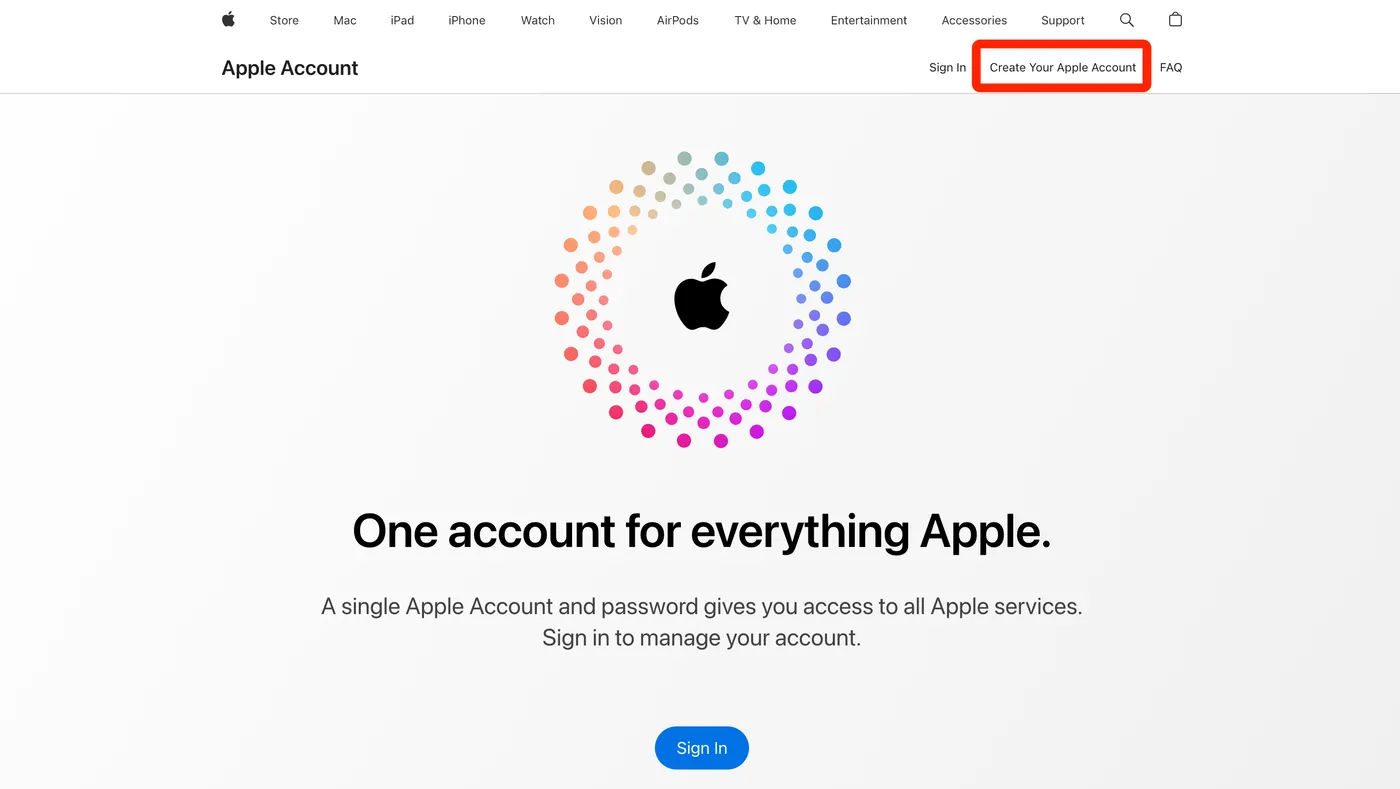
Go to account.apple.com in a browser and click Create Your Apple Account. Apple rebranded "Apple ID" to "Apple Account" in late 2024; the old appleid.apple.com URL still redirects, and both terms get used interchangeably in the wild.
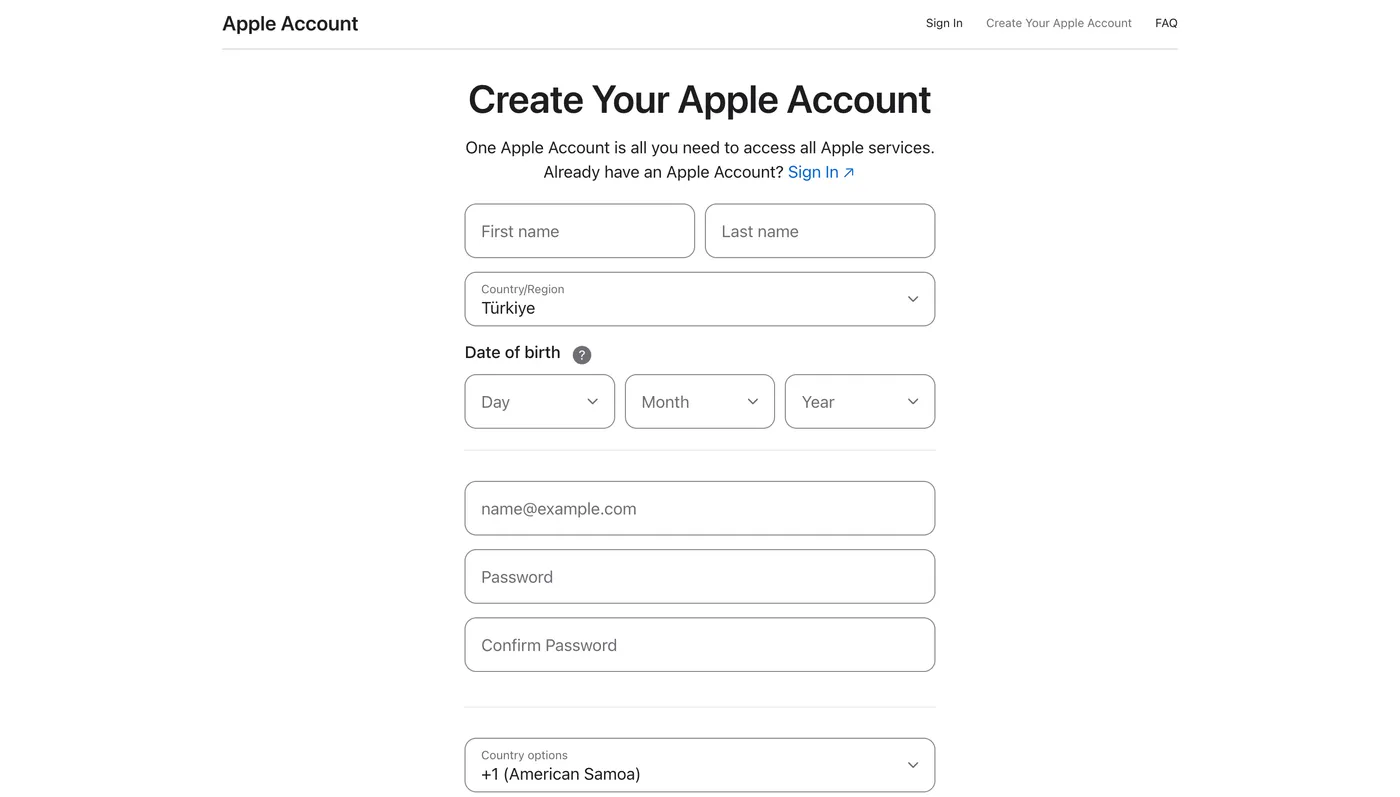
The form asks for the basics (name, date of birth, country/region, email, password, phone). A few notes while you fill it in:
- Real name is not required. Apple is not running KYC at this stage. Use any plausible name you will remember when support asks later. A transliteration of your real name to roman letters works fine.
- Country / Region: select Türkiye. Apple's region-change flow is gated behind multiple conditions and is not friendly to brand-new accounts. If you accidentally register under the wrong country, the cleanest fix is to abandon the account and start over with a different email.
- Pick a strong password. Apple's strength rules get tweaked from time to time; whatever the form accepts is what the form accepts.
- Phone number can be from any country. A non-Turkish number works. The number is used for SMS verification, not for region-locking the account.
Step 2: Email and Phone Verification
Two 6-digit codes, in order. The form does not move forward until both are correct.
After you submit the form, Apple sends a 6-digit code to the email address you entered. Type it into the next screen, and Apple immediately sends a second 6-digit code to your phone number via SMS. Enter that one too.
When something goes wrong
Two failure modes account for almost every stuck registration I have seen.
The email code never arrives
- Check the spam folder. Apple's verification mail can land in junk, especially on corporate Office 365 setups that filter external mail aggressively.
- Switch to a mainstream email provider; Gmail or Outlook are the safest bets.
- If the email had ever been associated with an Apple Account in the past, even one you deleted, Apple will silently refuse it. Try a different address.
Registration fails after the verification codes are submitted
If both codes go through but the form still will not move you past the final screen, two things are usually responsible:
- Device limit. The current device has been used to create too many Apple Accounts in the last year. Switch to a different device, or use a desktop browser if you have been hitting it from iPhone Settings.
- Phone reuse. The number has been used too often. Different number, different result.
Step 3: Sign In on the App Store, Not iCloud
The single biggest beginner mistake, which is why this section gets its own block.
Do not sign out of your main iCloud account
The Turkish Apple Account is for the App Store only. Your iCloud (photos, messages, contacts, Find My, backups) should stay on your existing main account.
iOS treats these as two separate slots:
iCloud account
Settings → [your name] at the very top
Controls personal data and device-level features. Leave this alone.
Media & Purchases account
Settings → [your name] → Media & Purchases · or App Store → profile picture top right
Controls app downloads and app subscriptions. This is the slot we change.
You can have a US iCloud and a Turkish App Store happily coexist on the same device.
To switch only the App Store account on your iPhone
- Open the App Store app.
- Tap your profile picture in the top right.
- Scroll all the way to the bottom and tap Sign Out.
- Tap the profile circle again, then sign in with the Turkish Apple Account you just created.
Tip: on a fresh account, if you are asked to bind a Turkish phone number or bank card while subscribing or switching regions, pick None in the payment method list. If None does not show up, switch your VPN to a Turkey node and reload the page; None will reappear, and tapping it lets you skip the Turkish phone or bank requirement. The first time you actually buy a paid app or make an in-app purchase, the App Store will prompt you for a Turkish billing address; fill in one in valid Türkiye format (province, district, and postal code that match).
Bottom Line
Once you have signed in on the App Store, your account is in Türkiye. Subscriptions you buy from this point forward are billed at the Turkish lira regional price.
Frequently Asked Questions
Do I need a Turkish phone number?
Will switching App Store regions affect my iCloud, photos, or Find My?
Can I switch my existing Apple Account to Türkiye instead?
Is using a Turkish Apple Account against Apple's Terms of Service?
Explore Global App Store & AI Pricing
Compare real-time prices and currency differences for popular apps and streaming services worldwide.

About OpenTheRank
OpenTheRank tracks regional pricing for hundreds of AI and streaming services across global App Store regions. This guide is compiled from my personal notes while registering multiple Apple Accounts to verify price data.